Every highlight keeps its conversation
The thread is saved inside your PDF, so it travels with the file and shows up in Preview and Acrobat too.
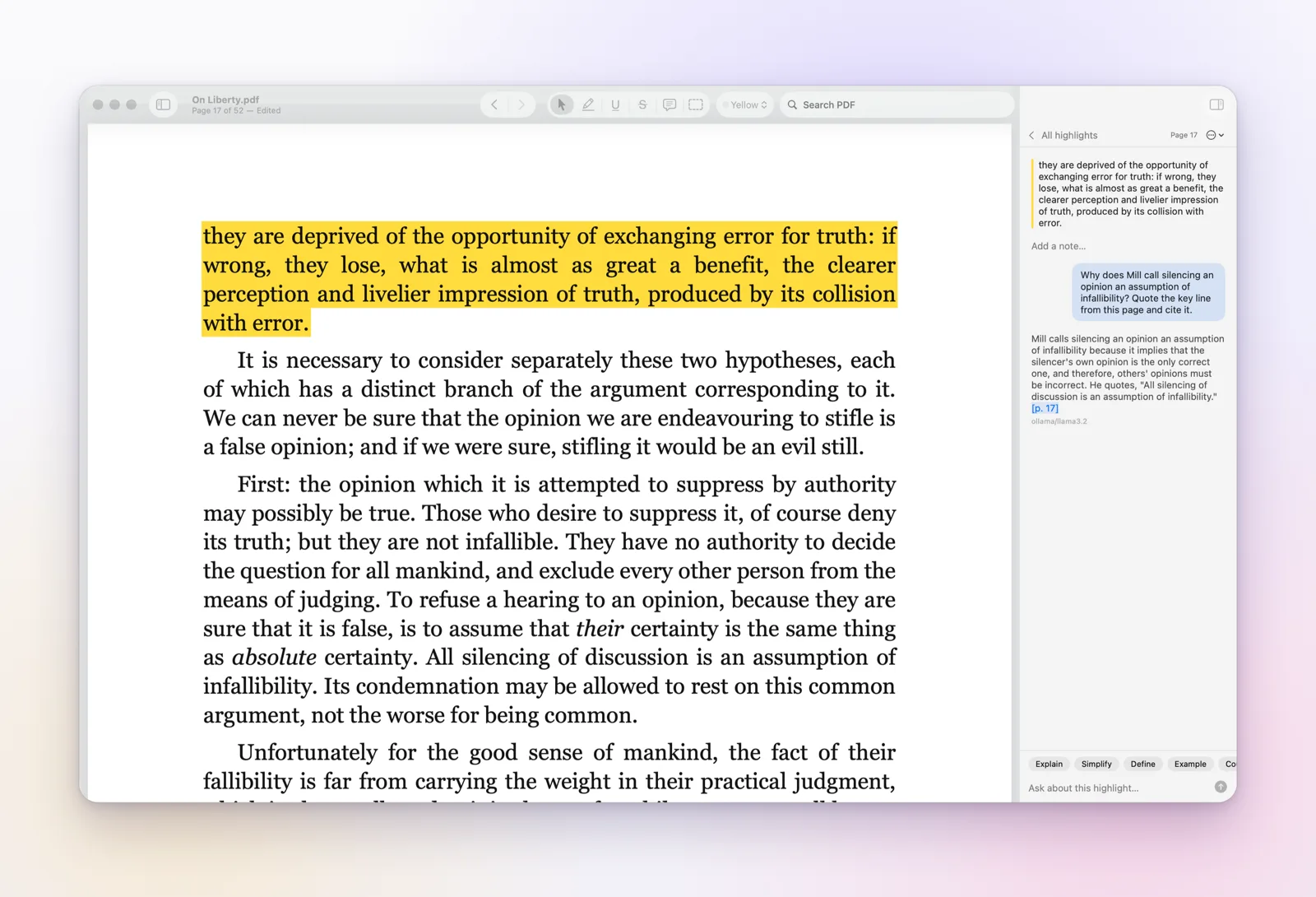
A PDF reader for Mac where every highlight can carry a conversation. Open a PDF, an arXiv paper or any web article, ask about a passage, and get an answer that cites its page, saved on the highlight, inside the file.
macOS 14 or later. Free while in beta.
We like to think of memory as a recording we can replay. It is closer to a retelling. Each time we recall an event, we rebuild it from fragments, and the rebuilt version is what we store again. Over the years the story grows smoother and more confident, even as it drifts from what happened.
This is why vivid memories feel so reliable, and why they so often are not. The details we are surest of are frequently the ones we have told most often, and each telling sands away a little more of the original.
None of this makes memory useless. It makes it something to be checked, the way a careful reader checks a source.
Psychologists who study eyewitnesses see the same pattern again and again. A witness questioned twice gives a firmer account the second time, not because they remember more, but because the first conversation has become part of the memory itself.
Recalling a memory edits it: you save the rebuilt copy, not the original. Repeat that often and a memory becomes confident but less accurate p. 42
Pick a highlighter colour once, then select text the way you would with a pen.
Explain, Define, Simplify, Example or Counter-argument in one click, or type your own question.
Answers cite pages like p. 42. Click to jump there; Glossa confirms the quoted words are on that page.
The thread is saved inside your PDF, so it travels with the file and shows up in Preview and Acrobat too.
Paste a link with File › Open Link… (⇧⌘O). PDFs open as they are, arXiv papers arrive as their PDF, and blog posts and articles are saved as a clean PDF, ready to highlight and ask about.
Choose once in Settings. You can change it any time.
Apple Intelligence runs on-device and is free. No key, no account, nothing leaves your Mac.
Run any open model with Ollama or LM Studio. Works offline.
OpenRouter, Anthropic, OpenAI or Gemini. Keys stay in your Mac's Keychain.
Glossa never rewrites your PDF. It only adds your annotations, and it checks every save.
No. On Macs with Apple Intelligence, Glossa uses Apple's on-device model for free. You can also run a local model with Ollama, or add your own key for stronger cloud models.
Glossa has no account, no analytics and no servers. On-device and local AI send nothing anywhere. With a cloud provider, only the passage you ask about is sent, to the provider you chose, after you agree. Read the privacy policy.
Yes. Paste a link into File › Open Link… and Glossa saves the article as a clean PDF with a link back to the original, so highlights, chats and page citations work the same way. The support page has a one-click bookmark for any browser.
Your file is never rewritten. Highlights are added as standard PDF annotations, so they also appear in Preview, Acrobat and other readers.
Reading, highlighting and AI chat will be free. A one-time Glossa Pro purchase will unlock Book Notes, figures and whole-book questions.

Free download for Macs with macOS 14 or later. On first open, macOS asks you to confirm it; the download page shows how.
Download Glossa 0.9 betaOnly used for Glossa updates. Privacy policy